
62 lines
3.2 KiB
Markdown
62 lines
3.2 KiB
Markdown
### 一、组网说明
|
||
|
||
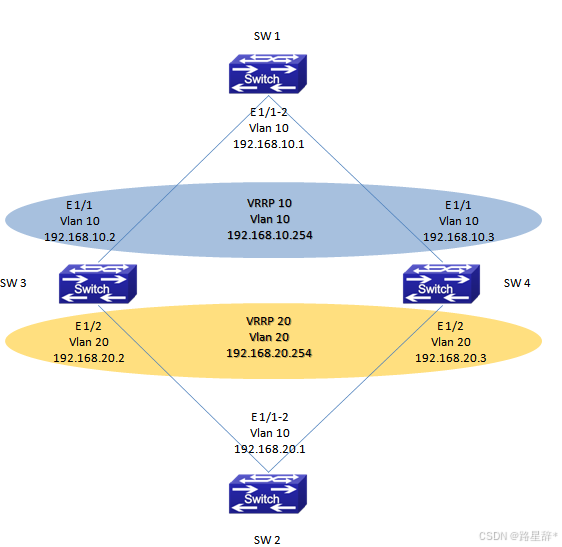
SW 3和SW 4两台交换机运行VRRP协议,为SW 1和SW 2提供虚拟网关服务,以保证SW 3和SW 4任意一台设备或链路中断的情况下SW 1还可以和SW 2通讯。
|
||
|
||
### 二、组网图
|
||
|
||
|
||
|
||
### 三、配置步骤
|
||
|
||
SW 3的配置
|
||
#配置Vlan和三层接口
|
||
switch(config)#**vlan** 10
|
||
switch(config-Vlan10)#**switchport interface ethernet address** 1/1
|
||
switch(config-Vlan10)#**ip address** 192.168.10.2 255.255.255.0
|
||
switch(config-Vlan10)#**exit**
|
||
switch(config)#**vlan** 20
|
||
switch(config-Vlan20)#**switchport interface ethernet address** 1/2
|
||
switch(config-Vlan20)#**ip address** 192.168.20.2 255.255.255.0
|
||
switch(config-Vlan20)#**exit**
|
||
#配置VRRP
|
||
switch(config)#**router vrrp** 10
|
||
switch(config-router)#**virtual-ip** 192.168.10.254
|
||
switch(config-router)#**interface vlan** 10
|
||
switch(config-router)#**priority** 120
|
||
switch(config-router)#**enable**
|
||
switch(config-router)#**exit**
|
||
switch(config)#**router vrrp** 20
|
||
switch(config-router)#**virtual-ip** 192.168.20.254
|
||
switch(config-router)#**interface vlan** 20
|
||
switch(config-router)#**priority** 120
|
||
switch(config-router)#**enable**
|
||
switch(config-router)#**exit**
|
||
SW 4的配置
|
||
#配置Vlan和三层接口
|
||
switch(config)#**vlan** 10
|
||
switch(config-Vlan10)#**switchport interface ethernet address** 1/1
|
||
switch(config-Vlan10)#**ip address** 192.168.10.3 255.255.255.0
|
||
switch(config-Vlan10)#**exit**
|
||
switch(config)#**vlan** 20
|
||
switch(config-Vlan20)#**switchport interface ethernet address** 1/2
|
||
switch(config-Vlan20)#**ip address** 192.168.20.3 255.255.255.0
|
||
switch(config-Vlan20)#**exit**
|
||
#配置VRRP
|
||
switch(config)#**router vrrp** 10
|
||
switch(config-router)#**virtual-ip** 192.168.10.254
|
||
switch(config-router)#**interface vlan** 10
|
||
switch(config-router)#**enable**
|
||
switch(config-router)#**exit**
|
||
switch(config)#**router vrrp** 20
|
||
switch(config-router)#**virtual-ip** 192.168.20.254
|
||
switch(config-router)#**interface vlan** 20
|
||
switch(config-router)#**enable**
|
||
switch(config-router)#**exit**
|
||
|
||
### 四、注意事项
|
||
|
||
1.VRRP配置完成后,必须使用enable命令将VRRP使能。否则VRRP配置不生效。在修改VRRP组的配置时,也需要先将VRRP组Disable后才可以修改VRRP组的配置。
|
||
2.VRRP组的ID号从1-255,总共可以创建255个VRRP组。
|
||
3.VRRP组默认监控的是三层接口的UP/Down,在冗余链路的环境中,需要配合STP协议一起使用,以保证网络的可用性。(后续版本中,可以配合BFD功能监控物理接口的UP/Down)
|
||
4.VRRP的交互报文只有定期发送的Hello报文,默认的交互时间是1S。当整机的VRRP组超过10组时,建议修改VRRP的交互间隔,避免设备在同一时间处理大量的VRRP报文。
|
||
5.VRRP组根据优先级比较确认那台设备会成为Master,默认的优先级是100。优先级相同时,再比较IP地址,IP地址较大的一台会做为Master。 |