- 1.技术选型
- 2.创建elasticsearch公共包
- 3.导入依赖
- 4.数据库准备
- 5.实现Repository 接口(ES)和Mapper(MySQL)
- 6.Service代码
图片
## **1. 技术选型**
使用 Elasticsearch (ES) 结合 MySQL 进行数据存储和查询,而不是直接从 MySQL 中进行查询,主要是为了弥补传统关系型数据库(如 MySQL)在处理大规模、高并发和复杂搜索查询时的性能瓶颈。具体来说,ES 与 MySQL 结合使用的优势包括以下几个方面:
- **Elasticsearch优化了全文搜索:** MySQL 在处理复杂的文本搜索(如模糊匹配、全文搜索)时性能较差。尤其是当查询的数据量和文本内容增大时,MySQL 的性能会急剧下降。而 Elasticsearch 专门为高效的文本搜索设计,能够通过倒排索引和分布式架构优化查询性能,适用于大规模数据集的全文搜索,查询速度通常比 MySQL 快得多。
- **高效的复杂查询:** Elasticsearch 对于复杂的查询,如多条件搜索、范围查询、聚合查询等,提供了比 MySQL 更高效的执行方式。Elasticsearch 支持文档级的分词、词汇匹配、近似匹配等复杂查询方式,这在 MySQL 中是非常难以高效实现的。
- **实时搜索:** Elasticsearch 提供了快速的实时数据检索能力,尤其适用于需要快速反馈结果的场景。与之相比,MySQL 在高并发时处理复杂查询的能力相对较弱。
## **2. 创建elasticsearch公共包**
当然这里我是使用微服务的思想,不直接将ES服务直接导入,在业务模块下。如果只是学习使用,或者简单的开发中,可以直接将组件(服务)直接导入到需要使用该组件的服务中。
因为这里不需要对ES做过多的配置,但是在以后的开发中却说不准,这样创建ES服务,然后再在需要使用的服务中导入ES依赖,这样似乎是很麻烦,但是在以后进行统一管理还是比较方便的。
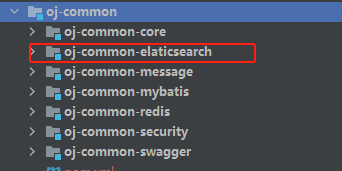
ES作为一个公共的组件,我选择在common公共包下面单独创建一个ES的服务。
图片
## **3. 导入依赖**
` org.springframework.boot spring-boot-starter-data-elasticsearch `
在需要的服务中再导入elasticsearch我们自己的服务
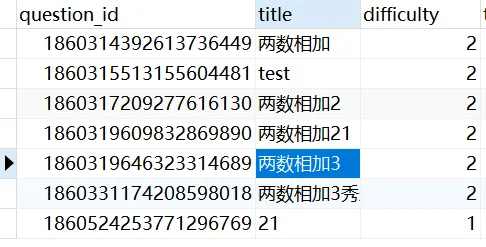
## **4. 数据库准备**
图片
``/* Navicat Premium Data Transfer Source Server : docker-oj Source Server Type : MySQL Source Server Version : 50744 Source Host : localhost:3307 Source Schema : bitoj_dev Target Server Type : MySQL Target Server Version : 50744 File Encoding : 65001 Date: 04/12/2024 12:12:41 */ SET NAMES utf8mb4; SET FOREIGN_KEY_CHECKS = 0; -- ---------------------------- -- Table structure for tb_question -- ---------------------------- DROP TABLE IF EXISTS `tb_question`; CREATE TABLE `tb_question` ( `question_id` bigint(20) UNSIGNED NOT NULL COMMENT '题目id', `title` varchar(50) CHARACTER SET utf8mb4 COLLATE utf8mb4_general_ci NULL DEFAULT NULL, `difficulty` tinyint(4) NOT NULL COMMENT '题目难度1:简单 2:中等 3:困难', `time_limit` int(11) NOT NULL COMMENT '时间限制', `space_limit` int(11) NOT NULL COMMENT '空间限制', `content` varchar(1000) CHARACTER SET utf8mb4 COLLATE utf8mb4_general_ci NOT NULL COMMENT '题目内容', `question_case` varchar(1000) CHARACTER SET utf8mb4 COLLATE utf8mb4_general_ci NULL DEFAULT NULL COMMENT '题目用例', `default_code` varchar(1000) CHARACTER SET utf8mb4 COLLATE utf8mb4_general_ci NOT NULL COMMENT '默认代码块', `main_func` varchar(500) CHARACTER SET utf8mb4 COLLATE utf8mb4_general_ci NOT NULL COMMENT 'main函数', `create_by` bigint(20) UNSIGNED NOT NULL COMMENT '创建人', `create_time` datetime NOT NULL COMMENT '创建时间', `update_by` bigint(20) UNSIGNED NULL DEFAULT NULL COMMENT '更新人', `update_time` datetime NULL DEFAULT NULL COMMENT '更新时间', `is_del` tinyint(4) NOT NULL DEFAULT 0 COMMENT '逻辑删除标志位 0:未被删除 1:被删除', PRIMARY KEY (`question_id`) USING BTREE ) ENGINE = InnoDB CHARACTER SET = utf8mb4 COLLATE = utf8mb4_general_ci ROW_FORMAT = Dynamic; -- ---------------------------- -- Records of tb_question -- ---------------------------- INSERT INTO `tb_question` VALUES (1860314392613736449, '两数相加', 2, 1000, 256, '给定两个非负整数,分别用链表表示,每个节点表示一位数字。将这两个数字相加并以相同形式返回结果。', '[{\"input\":\"[2,4,3]\\n[5,6,4]\",\"output\":\"[7,0,8]\"}, {\"input\":\"[0]\\n[0]\",\"output\":\"[0]\"}]', 'public ListNode addTwoNumbers(ListNode l1, ListNode l2) {\\n // TODO: 实现你的算法\\n}', 'public static void main(String[] args) {\\n ListNode l1 = new ListNode(2, new ListNode(4, new ListNode(3)));\\n ListNode l2 = new ListNode(5, new ListNode(6, new ListNode(4)));\\n ListNode result = addTwoNumbers(l1, l2);\\n System.out.println(result);\\n}', 1, '2024-11-23 21:28:09', 1, NULL, 0); INSERT INTO `tb_question` VALUES (1860315513155604481, 'test', 2, 12, 12, '113厄尔
', '222', '22', '222', 1, '2024-11-23 21:32:36', 1, NULL, 0); INSERT INTO `tb_question` VALUES (1860317209277616130, '两数相加2', 2, 1000, 256, '给定两个非负整数,分别用链表表示,每个节点表示一位数字。将这两个数字相加并以相同形式返回结果。', '[{\"input\":\"[2,4,3]\\n[5,6,4]\",\"output\":\"[7,0,8]\"}, {\"input\":\"[0]\\n[0]\",\"output\":\"[0]\"}]', 'public ListNode addTwoNumbers(ListNode l1, ListNode l2) {\\n // TODO: 实现你的算法\\n}', 'public static void main(String[] args) {\\n ListNode l1 = new ListNode(2, new ListNode(4, new ListNode(3)));\\n ListNode l2 = new ListNode(5, new ListNode(6, new ListNode(4)));\\n ListNode result = addTwoNumbers(l1, l2);\\n System.out.println(result);\\n}', 1, '2024-11-23 21:39:20', 1, NULL, 0); INSERT INTO `tb_question` VALUES (1860319609832869890, '两数相加21', 2, 1000, 256, '给定两个非负整数,分别用链表表示,每个节点表示一位数字。将这两个数字相加并以相同形式返回结果。
', '[{\"input\":\"[2,4,3]\\n[5,6,4]\",\"output\":\"[7,0,8]\"}, {\"input\":\"[0]\\n[0]\",\"output\":\"[0]\"}]', 'public ListNode addTwoNumbers(ListNode l1, ListNode l2) {\\n // TODO: 实现你的算法\\n}', 'public static void main(String[] args) {\\n ListNode l1 = new ListNode(2, new ListNode(4, new ListNode(3)));\\n ListNode l2 = new ListNode(5, new ListNode(6, new ListNode(4)));\\n ListNode result = addTwoNumbers(l1, l2);\\n System.out.println(result);\\n}', 1, '2024-11-23 21:48:53', 1, '2024-11-24 16:03:57', 0); INSERT INTO `tb_question` VALUES (1860319646323314689, '两数相加3', 2, 1000, 256, '给定两个非负整数,分别用链表表示,每个节点表示一位数字。将这两个数字相加并以相同形式返回结果。', '[{\"input\":\"[2,4,3]\\n[5,6,4]\",\"output\":\"[7,0,8]\"}, {\"input\":\"[0]\\n[0]\",\"output\":\"[0]\"}]', 'public ListNode addTwoNumbers(ListNode l1, ListNode l2) {\\n // TODO: 实现你的算法\\n}', 'public static void main(String[] args) {\\n ListNode l1 = new ListNode(2, new ListNode(4, new ListNode(3)));\\n ListNode l2 = new ListNode(5, new ListNode(6, new ListNode(4)));\\n ListNode result = addTwoNumbers(l1, l2);\\n System.out.println(result);\\n}', 1, '2024-11-23 21:49:01', 1, NULL, 0); INSERT INTO `tb_question` VALUES (1860331174208598018, '两数相加3秀爱', 2, 1000, 256, '给定两个非负整数,分别用链表表示,每个节点表示一位数字。将这两个数字相加并以相同形式返回结果。
', '[{\"input\":\"[2,4,3]\\n[5,6,4]\",\"output\":\"[7,0,8]\"}, {\"input\":\"[0]\\n[0]\",\"output\":\"[0]\"}]', 'public ListNode addTwoNumbers(ListNode l1, ListNode l2) {\\n // TODO: 实现你的算法\\n}', 'public static void main(String[] args) {\\n ListNode l1 = new ListNode(2, new ListNode(4, new ListNode(3)));\\n ListNode l2 = new ListNode(5, new ListNode(6, new ListNode(4)));\\n ListNode result = addTwoNumbers(l1, l2);\\n System.out.println(result);\\n}', 1, '2024-11-23 22:34:50', 1, '2024-11-24 15:58:17', 0); INSERT INTO `tb_question` VALUES (1860524253771296769, '21', 1, 2, 2, '2
', '2', '2', '2', 1, '2024-11-24 11:22:04', 1, '2024-11-24 15:58:07', 0); SET FOREIGN_KEY_CHECKS = 1; ``
现在的需求是:通过题目的题目或者是题目内容来对题目进行检索。
为ES和mysql创建对应的实体类:
**ES:**
`import org.springframework.data.elasticsearch.annotations.Document; import lombok.Getter; import lombok.Setter; import org.springframework.data.annotation.Id; import org.springframework.data.elasticsearch.annotations.DateFormat; import org.springframework.data.elasticsearch.annotations.Document; import org.springframework.data.elasticsearch.annotations.Field; import org.springframework.data.elasticsearch.annotations.FieldType; import java.time.LocalDateTime; @Getter @Setter @Document(indexName = "idx_question") public class QuestionES { @Id @Field(type = FieldType.Long) private Long questionId; @Field(type = FieldType.Text, analyzer = "ik_max_word", searchAnalyzer = "ik_max_word") private String title; @Field(type = FieldType.Byte) private Integer difficulty; @Field(type = FieldType.Long) private Long timeLimit; @Field(type = FieldType.Long) private Long spaceLimit; @Field(type = FieldType.Text, analyzer = "ik_max_word", searchAnalyzer = "ik_max_word") private String content; @Field(type = FieldType.Text) private String questionCase; @Field(type = FieldType.Text) private String mainFunc; @Field(type = FieldType.Text) private String defaultCode; @Field(type = FieldType.Date, format = DateFormat.date_hour_minute_second) private LocalDateTime createTime; } `
**mysql:**
`import com.baomidou.mybatisplus.annotation.IdType; import com.baomidou.mybatisplus.annotation.TableId; import com.baomidou.mybatisplus.annotation.TableName; import com.guan.common.core.domain.BaseEntity; import lombok.Getter; import lombok.Setter; @TableName("tb_question") @Getter @Setter public class Question extends BaseEntity { @TableId(type = IdType.ASSIGN_ID) private Long questionId; private String title; private Integer difficulty; private Long timeLimit; private Long spaceLimit; private String content; private String questionCase; private String defaultCode; private String mainFunc; } `
#### 4.1. @Document(indexName = "idx_question")
该注解表示这是一个 Elasticsearch 的文档(document)类。
indexName 属性指定了在 Elasticsearch 中存储该文档的索引名称,即 `idx_question`。这意味着 Elasticsearch 会将这个类的数据存储在名为 `idx_question` 的索引中。
#### 4.2. Id
表示该字段是文档的唯一标识符。在 Elasticsearch 中,每个文档都必须有一个唯一的 ID,用来区分不同的文档。 在这里,questionId 被标注为唯一标识符,即 Elasticsearch 文档的 ID。
#### 4.3. @Field
@Field 注解用于指定字段在 Elasticsearch 中的类型、分析器等信息。它是 `Spring Data Elasticsearch` 提供的一个注解,用于定义如何在 Elasticsearch 中映射数据。
## **5. 实现Repository 接口(ES)和Mapper(MySQL)**
#### 5.1. Elasticsearch -- Repository 接口
`Spring Data Elasticsearch` 的 Repository 接口,用于与 Elasticsearch 交互。它继承了 `ElasticsearchRepository`,这使得 `Spring Data Elasticsearch` 可以自动为它提供基本的 CRUD 操作。这个接口专门用于操作 QuestionES 类型的文档,并提供了一些自定义查询方法。可以类比于用于操作数据库的mapper接口类。
`import com.guan.friend.domain.question.es.QuestionES; import org.springframework.data.domain.Page; import org.springframework.data.domain.Pageable; import org.springframework.data.elasticsearch.annotations.Query; import org.springframework.data.elasticsearch.repository.ElasticsearchRepository; import org.springframework.stereotype.Repository; @Repository public interface IQuestionRepository extends ElasticsearchRepository { Page findQuestionByDifficulty(Integer difficulty, Pageable pageable); //select * from tb_question where (title like '%aaa%' or content like '%bbb%') and difficulty = 1 @Query("{\"bool\": {\"should\": [{ \"match\": { \"title\": \"?0\" } }, { \"match\": { \"content\": \"?1\" } }], \"minimum_should_match\": 1, \"must\": [{\"term\": {\"difficulty\": \"?2\"}}]}}") Page findByTitleOrContentAndDifficulty(String keywordTitle, String keywordContent,Integer difficulty, Pageable pageable); @Query("{\"bool\": {\"should\": [{ \"match\": { \"title\": \"?0\" } }, { \"match\": { \"content\": \"?1\" } }], \"minimum_should_match\": 1}}") Page findByTitleOrContent(String keywordTitle, String keywordContent, Pageable pageable); } `
**1. 方法:`findQuestionByDifficulty`**
方法目的:通过问题的 difficulty(难度)字段来查询问题,并分页返回结果。 返回一个 `Page`,表示分页查询的结果。difficulty 参数是查询条件,Pageable 参数是分页信息,Pageable 包含了页数和每页条数等信息。
查询类型:这个查询方法是基于 `Spring Data Elasticsearch` 的查询派发机制生成的,不需要手动编写查询语句。它会自动根据方法名推导出对应的查询操作。
**2. 方法:`findByTitleOrContentAndDifficulty`**
方法目的:根据标题 title 或内容 content 进行搜索,并且需要匹配问题的难度 difficulty。
@Query 注解:该注解用于定义自定义的 Elasticsearch 查询。查询采用的是 `Elasticsearch Query DSL`(Elasticsearch 查询语言)。
`{ "bool": { "should": [ { "match": { "title": "?0" } }, { "match": { "content": "?1" } } ], "minimum_should_match": 1, "must": [ { "term": { "difficulty": "?2" } } ] } } `
- **should:** 表示“或”条件,查询中 title 或 content 字段必须匹配给定的关键字(`?0` 和 `?1` 分别是方法参数 `keywordTitle` 和 `keywordContent`)。`minimum_should_match: 1` 意味着至少一个 should 子句必须匹配。
- **must:** 表示“且”条件,查询中 difficulty 字段必须匹配给定的难度(?2 是方法参数 difficulty)。该查询会检索标题或内容包含关键词的文档,并且难度符合指定值。
**3. 方法:`findByTitleOrContent`**
方法目的:根据标题 title 或内容 content 进行搜索,分页返回结果。
该方法的查询语句与 `findByTitleOrContentAndDifficulty` 方法类似,但没有添加 difficulty 字段的筛选条件。查询的条件是标题或内容匹配给定的关键词,`minimum_should_match: 1` 表示至少一个 should 子句匹配。
`{ "bool": { "should": [ { "match": { "title": "?0" } }, { "match": { "content": "?1" } } ], "minimum_should_match": 1 } } `
should:表示“或”条件,查询中 title 或 content 字段必须匹配给定的关键字(`?0` 和 `?1` 分别是方法参数 `keywordTitle` 和 `keywordContent`)。`minimum_should_match: 1` 表示至少一个 should 子句匹配。
#### 5.2. MySQL--Mapper
`import com.baomidou.mybatisplus.core.mapper.BaseMapper; import com.guan.friend.domain.question.Question; public interface QuestionMapper extends BaseMapper { } `
## **6. Service代码**
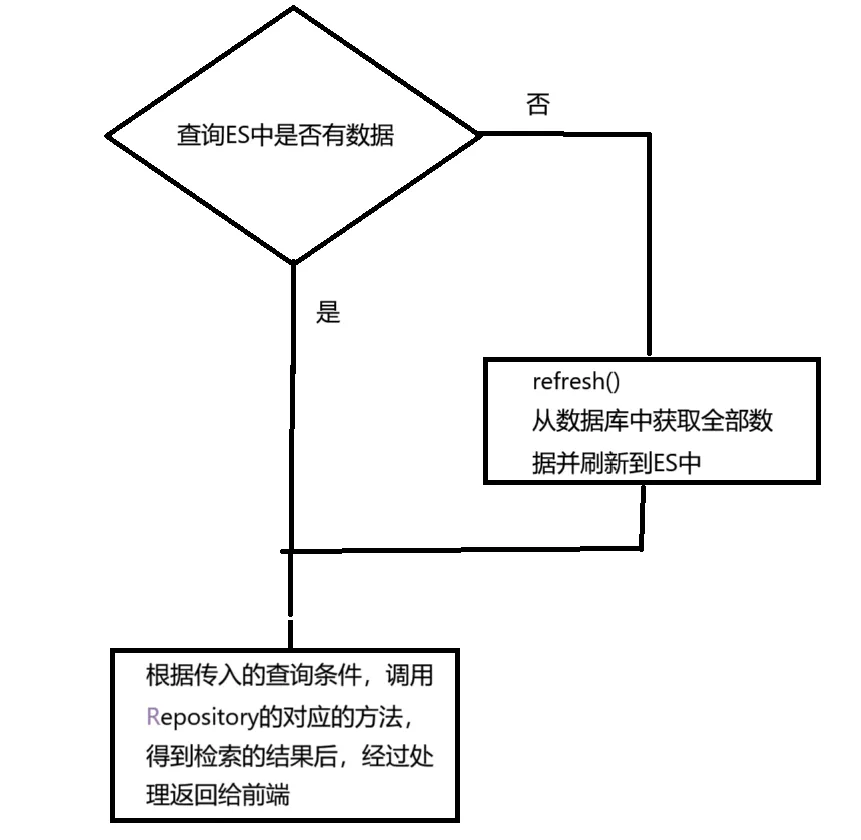
`import cn.hutool.core.bean.BeanUtil; import cn.hutool.core.collection.CollectionUtil; import cn.hutool.core.util.StrUtil; import com.baomidou.mybatisplus.core.conditions.query.LambdaQueryWrapper; import com.guan.common.core.domain.TableDataInfo; import com.guan.friend.domain.question.Question; import com.guan.friend.domain.question.dto.QuestionQueryDTO; import com.guan.friend.domain.question.es.QuestionES; import com.guan.friend.domain.question.vo.QuestionVO; import com.guan.friend.elasticsearch.IQuestionRepository; import com.guan.friend.mapper.question.QuestionMapper; import com.guan.friend.service.question.IQuestionService; import jakarta.annotation.Resource; import org.springframework.beans.factory.annotation.Autowired; import org.springframework.data.domain.Page; import org.springframework.data.domain.PageRequest; import org.springframework.data.domain.Pageable; import org.springframework.data.domain.Sort; import org.springframework.stereotype.Service; import java.util.List; @Service public class QuestionServiceImpl implements IQuestionService { @Autowired private IQuestionRepository questionRepository; @Resource private QuestionMapper questionMapper; @Override public TableDataInfo list(QuestionQueryDTO questionQueryDTO) { long count = questionRepository.count(); // 如果ES没有数据,从数据库同步 if(count <= 0){ refreshQuestion(); } // 指定排序规则是 按照创建时间 降序(新创建的题目在最上面) Sort orders = Sort.by(Sort.Direction.DESC, "createTime"); // 维护分页 Pageable pageable = PageRequest. of(questionQueryDTO.getPageNum() - 1, questionQueryDTO.getPageSize(), orders); Integer difficulty = questionQueryDTO.getDifficulty(); String keywords = questionQueryDTO.getKeywords(); Page questionESPage; if(difficulty == null && StrUtil.isEmpty(keywords)){// 查询参数都为空 questionESPage = questionRepository.findAll(pageable); }else if(StrUtil.isEmpty(keywords)){// 查询题目或内容为空 questionESPage = questionRepository.findQuestionByDifficulty(difficulty, pageable); }else if(difficulty == null){// 查询难度为空 questionESPage = questionRepository.findByTitleOrContent(keywords, keywords, pageable); }else{// 查询条件都不为空 questionESPage = questionRepository.findByTitleOrContentAndDifficulty(keywords, keywords, difficulty, pageable); } // 获取es中检索到的全部数据的数量 long total = questionESPage.getTotalElements(); if(total <= 0){ return TableDataInfo.empty(); } // 将ES的数据转换成VO List questionESList = questionESPage.getContent(); List questionVOList = BeanUtil.copyToList(questionESList, QuestionVO.class); return TableDataInfo.success(questionVOList, total); } private void refreshQuestion() { List questionList = questionMapper.selectList(new LambdaQueryWrapper()); if(CollectionUtil.isEmpty(questionList)){ return; } // 将数据库查到的题目列表数据 刷新到 ES 中 // 转换列表数据类型 List questionESList = BeanUtil.copyToList(questionList, QuestionES.class); questionRepository.saveAll(questionESList); } } `
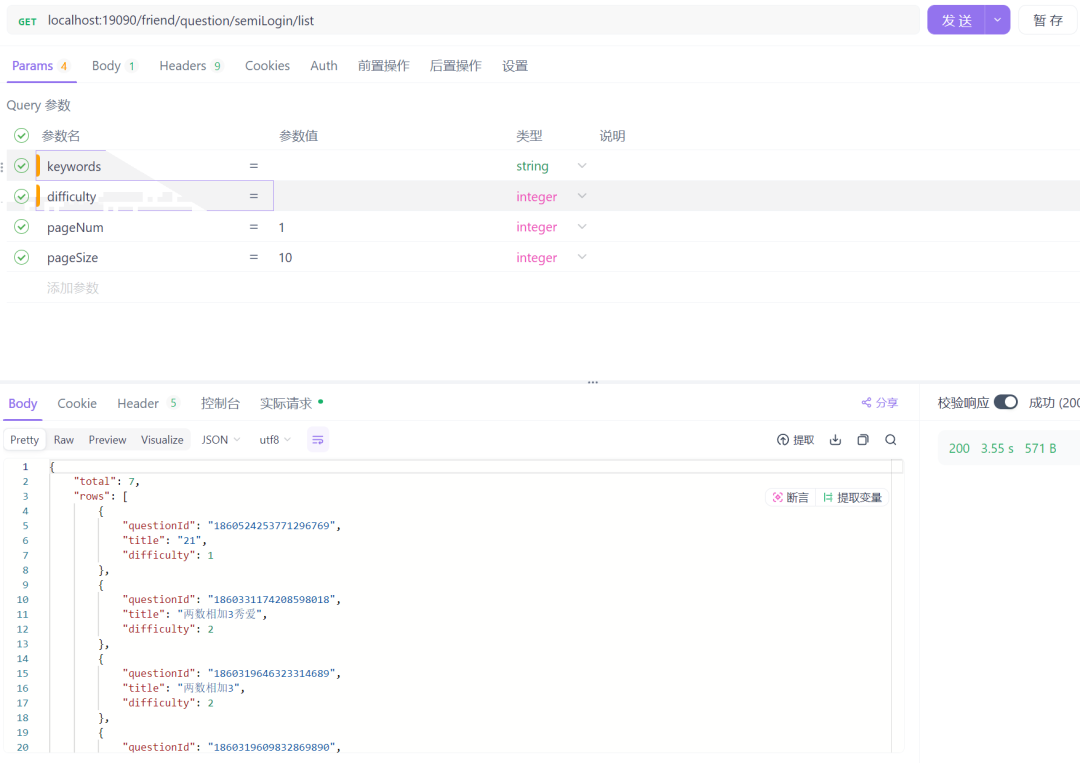
测试不传入查询条件:
图片
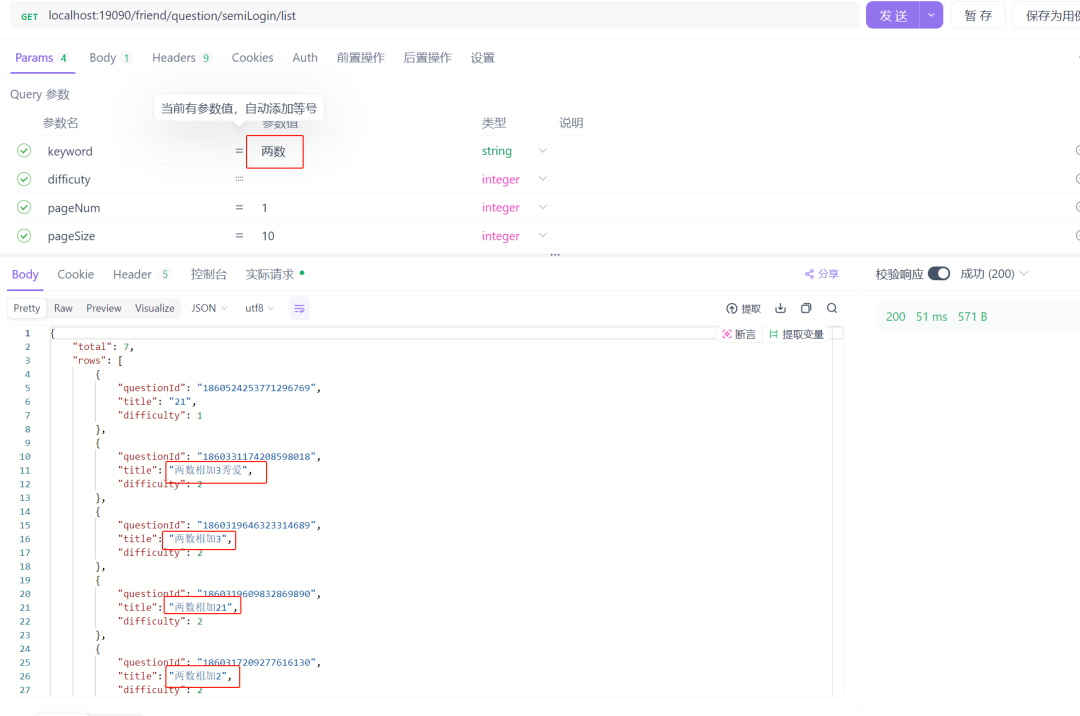
测试检索关键字
图片
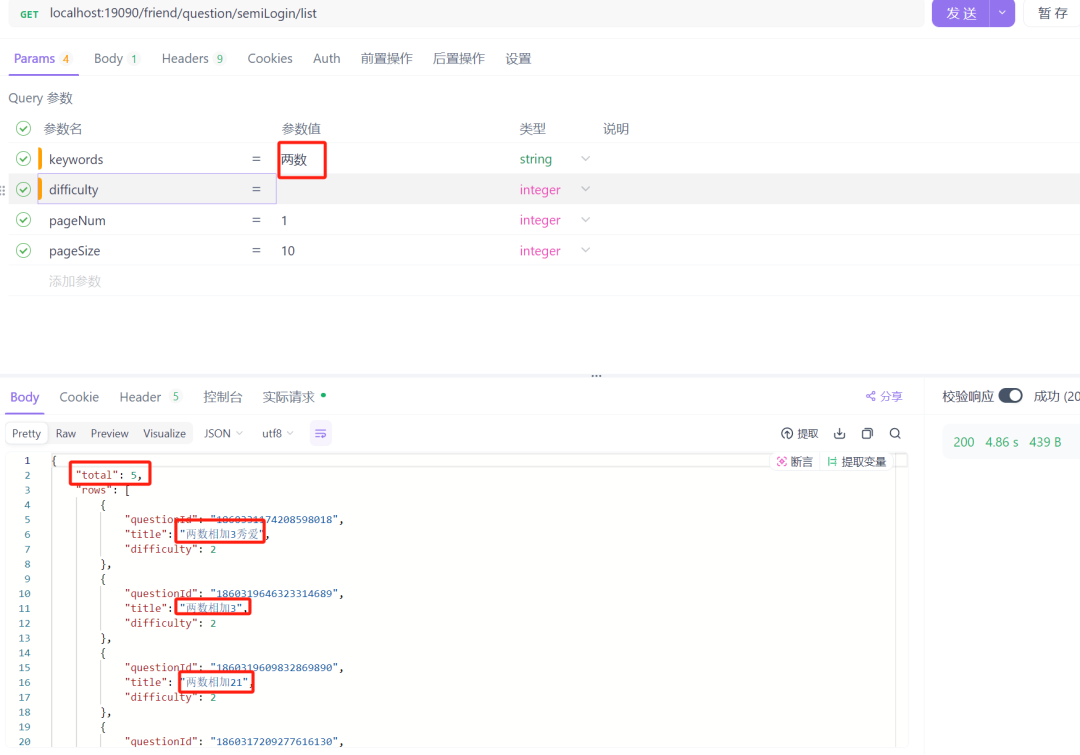
测试检索关键字
图片
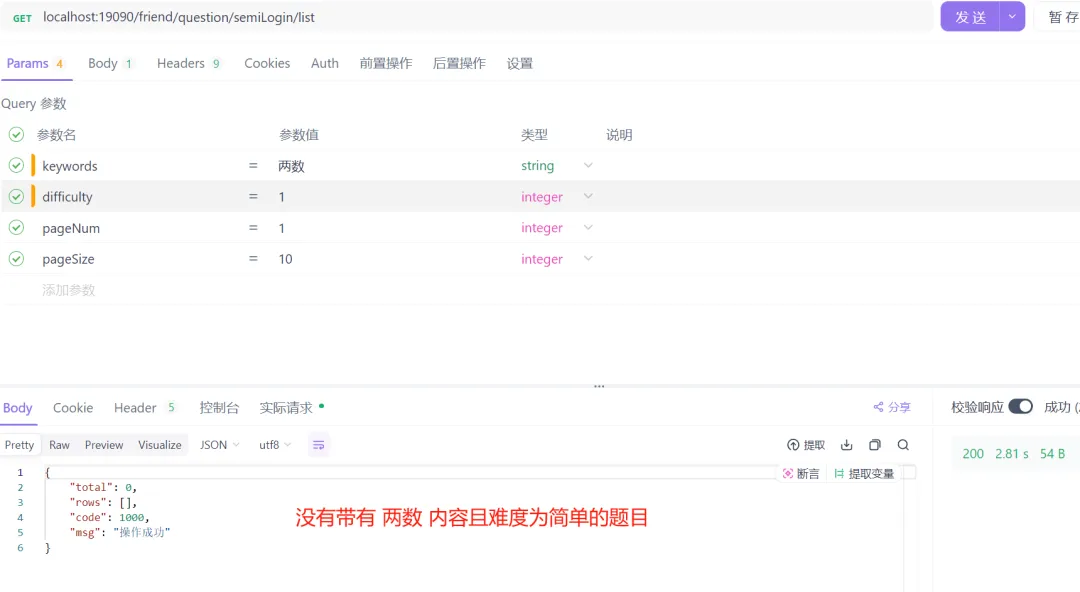
测试检索关键字+题目难度
图片